Website FAQ: Virtual Hairstyler - TheHairStyler.com
- How do I upload my photo to the Virtual Hairstyler?
- How do I delete/remove my uploaded photo?
- How do I delete/remove my saved makeover?
- I have uploaded my photo but cannot see it. What should I do?
- I've uploaded my photo but it won't load. What do I do?
- Can I upload more than one photo?
- How do I view my photo with the hairstyles?
- The hairstyles don't sit right on my photo. What can I do?
- What are the photo specifications?
- I want my photo to stay private. Will anyone else be able to see it if I upload it to my account?
- I cannot see all of the try on virtual hairstyler. How do I access/view the whole widget?
How do I upload my photo to the Virtual Hairstyler?
It's quite easy to upload a photo to the Virtual Hairstyler but to do so you must first be a member.
If you are not already a member then you can register for an account here: https://www.thehairstyler.com/signup.
To upload your photo simply follow these easy steps:
- Log into your account and visit the Virtual Hairstyler from the menu that runs along any page.
- Click on "Upload Photo" or "Capture Photo" at the center of the screen.
- If you choose to upload a photo from "Capture Photo", take a photo of yourself, then the photo will appear on the website.
- If you choose to upload a photo from "Upload Photo", choose a photo of yourself from your device, then the photo will appear on the website.
- Your photo will automatically resize and adjust itself. Now you can start viewing hairstyles
If you have any trouble uploading your photo then please send us an email and we will happily help you.
I want my photo to stay private. Will anyone else be able to see it if I upload it to my account?
To address privacy concerns, all photos are kept in a secure, password protected area which only the member has access to.
In regards to the photos that you upload to the Virtual Hairstyler to use while looking for a new hairstyle, these cannot be seen by anyone else.
I have uploaded my photo but cannot see it. What should I do?
First, please make sure that you have uploaded your photo to the Virtual Hairstyler. If your photo is uploaded to the Virtual Hairstyler, it will appear at the center of the screen.
If your photo is not there then please try uploading your photo.
If you still cannot see your photo after uploading it to the Virtual Hairstyler then please try the following:
- Make sure your browser is enabled to accept cookies and sessions. This is a default setting in your browser.
- Try deleting the cookies from your computer and clearing your browser's cache. This will make sure your browser is loading the latest page available.
- Use one of these browsers: Chrome, Mozilla Firefox, Microsoft Internet Explorer or Safari.
- Ensure your firewall is not preventing you from loading your photo. If it is then you will need to configure your firewall so it will accept cookies from our website address. Please click on your firewall and enable the firewall to allow TheHairStyler.com permission or follow instructions from your firewall's manual.
If you still cannot see your photo in the Virtual Hairstyler after following these steps then please contact us via email.
Can I upload more than one photo?
With a membership you can upload up to 50 photos to your account. This means that you can switch between photos, for example, one of you with glasses and one without. You can also change your photo at anytime.
Up to 50 photos can be uploaded at a time. When 50 photos have been added simply delete any unwanted photos to make room for more.
How do I view my photo with the hairstyles?
To view your photo with the hairstyles please follow these easy steps:
- Visit the Virtual Hairstyler.
- Click on the My Photos icon in the Virtual Hairstyler menu, then click on the photo you want to use to make it active. Your photo will then load in the middle of the Virtual Hairstyler.
- Next, click on the Hairstyles icon in the Virtual Hairstyler menu and use the drop down menus and search button in the Hairstyles box above the navigator to choose all styles or to narrow down your selection to specific styles.
- When you see a style you like, click on it to view it with your photo.
The hairstyles don't sit right on my photo. What can I do?
To ensure that the hairstyles sit well with your photo, we recommend that you upload a photo that closely follows our photo specifications guidelines.
If you still find that you cannot get the hairstyles to sit correctly after trying these suggestions then please send an email with your email to our friendly customer service department and we will happily help you make any adjustments to your photo so that you can receive the benefits of your membership.
What are the photo specifications?
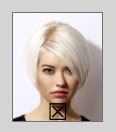
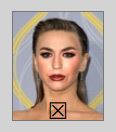
For the best results, we recommend that you make sure you upload a head and shoulders high quality photo of yourself, similar to the picture below, that also meets the following guidelines:

For more examples of what makes a great photo, visit our photo specifications page.
- You should be looking directly at the camera against a plain white background without tilting your head.
- Your hair should be tied back and behind your ears so your face and ears are well exposed.
- Your photo should be of normal size, clear, focused and well lit.
To be able to upload your photo it needs to be in a JPG format and the size should be less than 5 MB.
If your photo is too big please try taking it or scanning it at a lower setting, adjusting the size in a photo edit program, or using one of these free online image resizing tools.
- https://www.websiteplanet.com/webtools/imagecompressor/
- http://www.shrinkpictures.com/
- http://www.picresize.com/
Please remember that the better quality photo you upload, the better you will look with the different hair styles and colors.
If you have any trouble uploading your photo or reducing the size then please email our friendly customer service department and we will happily assist you.
How do I delete/remove my uploaded photo?
To delete any photo uploaded to the Virtual Hairstyler please use these easy steps:
- Login, go to the Virtual Hairstyler and click on the My Photos icon from the Virtual Hairstyler menu on the right.
- Click on the delete button (X) of the uploaded photo that you would like to delete.
- It will confirm if you want to delete your photo or cancel.
How do I delete/remove my saved makeover?
To delete any makeover you have saved to the Virtual Hairstyler please use these easy steps:
- Login, go to the Virtual Hairstyler and click on the My Makeovers icon from the Virtual Hairstyler menu on the right.
- Click on the delete button (X) of the makeover that you would like to delete.
- It will confirm if you want to delete your makeover or cancel.
From your Account:
- Login, go to the Account menu and choose the My Saved Favorites option.
- Click on the makeover that you would like to delete.
- Click on the Delete Makeover button.
I've uploaded my photo but it won't load. What do I do?
If you're having trouble loading your uploaded photo can you please make sure that you have done the following:
- Your photo is in a valid JPG photo format.
- The name of your photo does not have any unusual characters, i.e. <, ', /, * etc.
- That your photo is no bigger than 5Mb.
- That you have cleared your cache and reloaded the page before attempting to load your photo.
Most loading issues are caused by the size of the photo being uploaded. To correct the problem we recommend making sure that your photo is as small as possible. This will allow your photo to load more quickly and make it easier for you to view the hairstyles with your photo.
If your photo is over 5 MB then we kindly ask that you please use these tools to make your photo smaller:
- https://www.websiteplanet.com/webtools/imagecompressor/
- https://www.shrinkpictures.com/
- https://www.picresize.com/
If at anytime you have trouble resizing your photo then you can email us at info@thehairstyler.com and we will be more than happy to assist you.
I cannot see all of the try on virtual hairstyler. How do I access/view the whole widget?
To ensure that you can access and see all of the try on virtual hairstyler widget please try the following suggestions:
1. Turn off or hide any extra browser toolbars which can reduce the size of your browser window and stop it from showing the bottom control options of the widget.
2. Certain versions of different browsers may not display the site correctly so we recommend using the latest version of Mozilla Firefox, Google Chrome or Safari to view the site as intended.
If your question or problem is not listed here then please feel free to contact us at: info@thehairstyler.com with your registered email address so that we can assist you.