WEBSITE FAQ: SAVED FAVORITE MAKEOVERS
- How do I save a hairstyle makeover to my favorites?
- How do I view my saved makeovers?
- How do I save my makeovers to my computer?
- How do I delete my makeovers?
How do I save a hairstyle makeover to my "Saved Makeovers"?
To save a hairstyle makeover to your "Saved Makeovers", please use the following instructions:
1. Login and go to the Virtual Hairstyler.
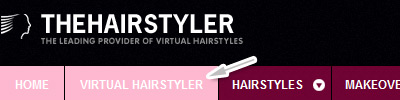
2. Load the hairstyle you'd like to save.
3. Click on the Save icon in the Virtual Hairstyler menu.
Note. You can save up to 100 makeovers.
How do I view my saved makeovers?
To view your makeovers from the Virtual Hairstyler please use the following instructions:
1. Go to the Virtual Hairstyler.
2. Click on the My Makeovers icon in the Virtual Hairstyler menu. Your saved makeovers will then load in the hairstyles strip.
3. Click on the thumbnails to load your makeovers on the main image in the Virtual Hairstyler so that you can make changes to the hair color or share on Facebook.
To view your makeovers from the saved makeovers page, login, go to the Account menu and choose the My Saved Makeovers option.
How do I save my makeovers to my computer?
To download any of your saved makeovers, please use these instructions:
- Login, go to the Virtual Hairstyler and click on the My Makeovers icon from the Virtual Hairstyler menu on the right.
- Click on the Makeover that you would like to download.
- Click on the "Share My Makeover" button near your large makeover image, then click on the download button
How do I delete my makeovers?
To delete any makeover you have saved to the Virtual Hairstyler please use these easy steps: From the Virtual Hairstyler:- Login, go to the Virtual Hairstyler and click on the My Makeovers icon from the Virtual Hairstyler menu on the right.
- Click on the delete button (X) of the makeover that you would like to delete.
- It will confirm if you want to delete your makeover or cancel.
From your Account:
- Login, go to the Account menu and choose the My Saved Makeovers option.
- Click on the makeover that you would like to delete.
- Click on the Delete Makeover button.
If your question or problem is not listed here then please feel free to contact us at info@thehairstyler.com with your registered email address so that we can assist you.